> ## Documentation Index
> Fetch the complete documentation index at: https://docs.memeperfect.io/llms.txt
> Use this file to discover all available pages before exploring further.
# Backtests
> Test your strategy against recent snapshot data before going live.
Backtests let you run a saved strategy against recent snapshot data to see how it would have performed. You get metrics like precision, recall, F1, and winner counts without risking real alerts.
Use backtests to tune rules, compare strategies, or validate changes before
activating.
### How to Run a Backtest
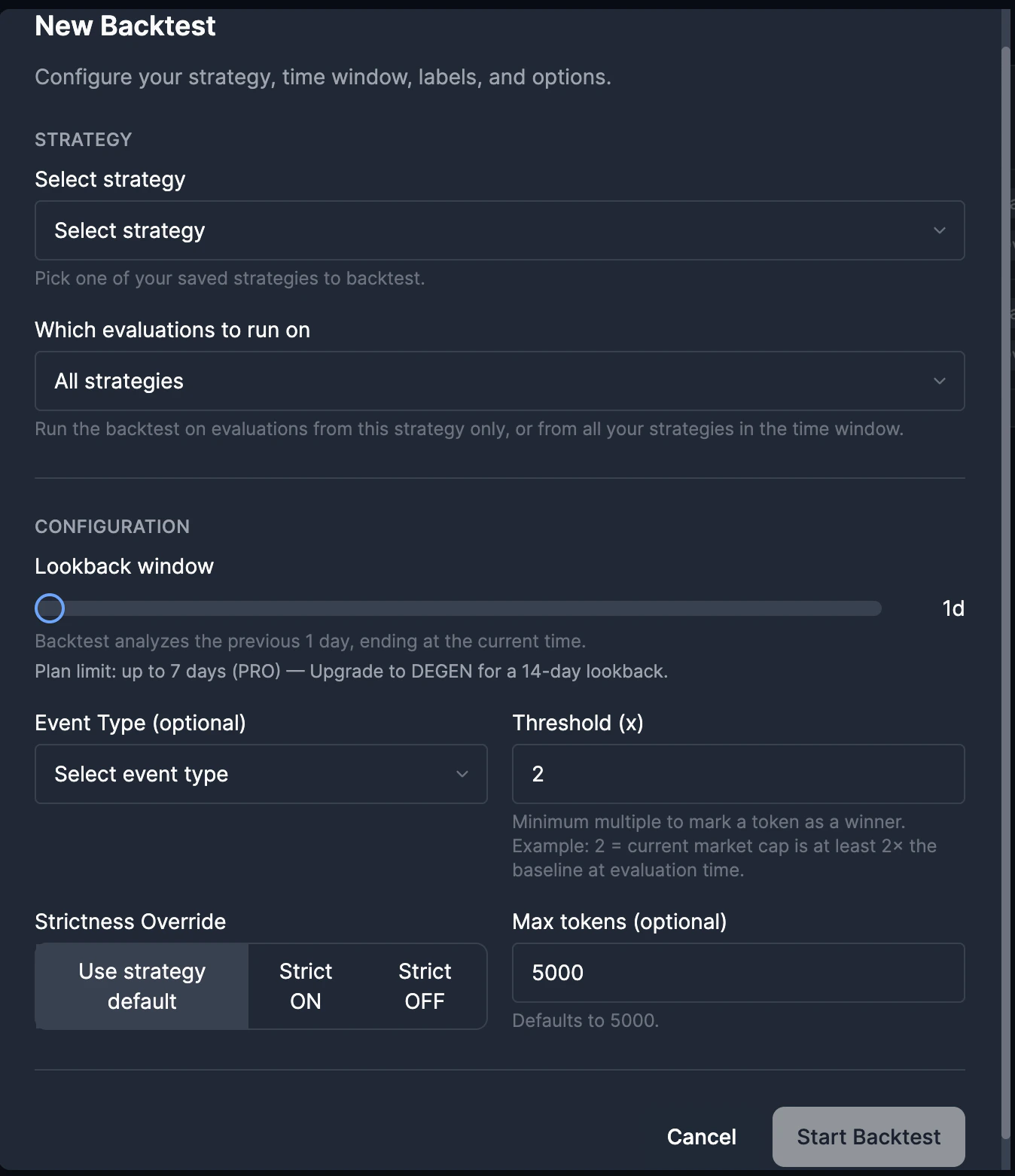
From the sidebar, go to **Strategies** → **Backtests**. Click **New
Backtest**.
Choose the strategy whose rules you want to test. This is the logic that
will be applied to historical data.
Select **All strategies** to run on evaluations from any of your strategies
in the time window, or pick one strategy to limit the source data.
Use the slider to pick 1–7 days (or up to 14 days on DEGEN plan). The
backtest analyzes the previous N days ending at the current time.
* **Event Type**: Filter by trigger type (e.g., Newly Created Tokens, Tweet
Metadata Match). - **Threshold (x)**: Minimum multiple to count as a winner
(e.g., 2 = market cap at least 2× baseline at evaluation time). -
**Strictness Override**: Use strategy default, or force Strict ON or Strict
OFF. - **Max tokens**: Limit how many evaluations to process (default 5000).
Click **Start Backtest**. You're redirected to the job page. Processing can
take several minutes.
 Backtests require an active subscription. Weekly plans and renewals may have
different limits.
### Run backtests through the API
Developers and agents can run the same async backtest workflow through the external API:
* `GET /backtests`
* `POST /backtests`
* `GET /backtests/:id`
* `GET /backtests/:id/results`
API backtests use the same stored strategy snapshot, hourly snapshot coverage, queue, worker, metrics, result filters, and plan limits as the app UI.
Create, poll, and inspect backtest jobs from your own systems.
### Job Statuses
* **QUEUED**: Job is waiting to run.
* **RUNNING**: Backtest is replaying snapshot observations.
* **COMPLETED**: Results are ready to view.
* **FAILED**: Job ended with an error.
### Understanding Results
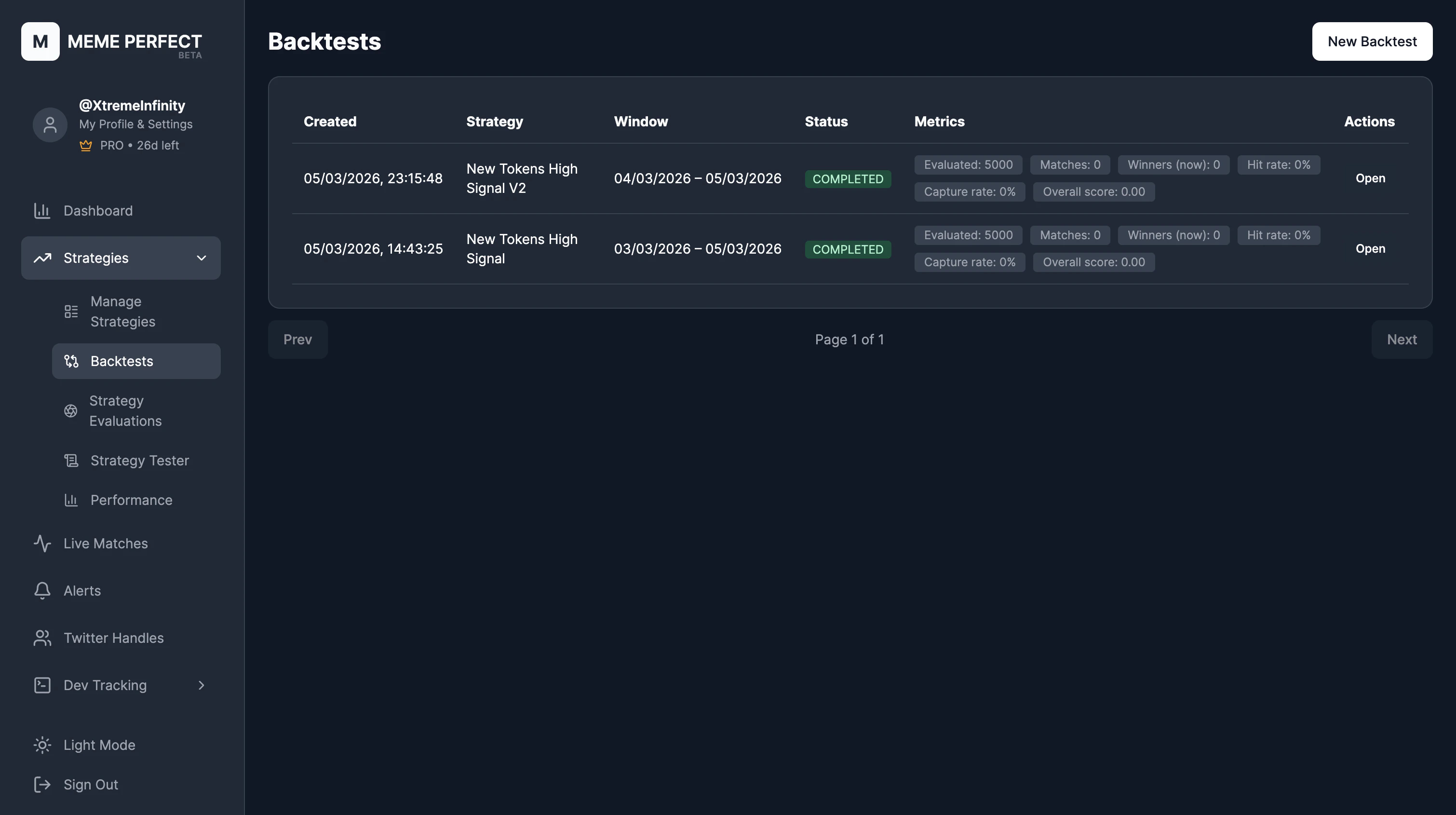
Once completed, the backtest job page shows:
* **Tested**: Number of token timelines evaluated.
* **Matches**: Tokens that matched your strategy rules.
* **Window winners**: Tokens that reached the threshold multiple inside the effective backtest window.
* **Precision**: Proportion of matches that were winners.
* **Recall**: Proportion of winners that your strategy caught.
* **F1**: Harmonic mean of precision and recall.
The result table stores matched tokens plus missed winners. Non-matched
non-winners still count in the metrics above, but they are not stored as result
rows.
### Filtering and Sorting Results
Use the result table filters:
* **Matched**: All, Yes, or No (whether the token matched your rules).
* **Window winners**: All, Yes, or No (whether the token reached the threshold inside the backtest window).
* **Multiple**: Min/max range for snapshot-window multiple.
* **Search token**: Filter by contract address.
* **Sort**: By evaluation timestamp, multiple, or other fields.
Backtests require an active subscription. Weekly plans and renewals may have
different limits.
### Run backtests through the API
Developers and agents can run the same async backtest workflow through the external API:
* `GET /backtests`
* `POST /backtests`
* `GET /backtests/:id`
* `GET /backtests/:id/results`
API backtests use the same stored strategy snapshot, hourly snapshot coverage, queue, worker, metrics, result filters, and plan limits as the app UI.
Create, poll, and inspect backtest jobs from your own systems.
### Job Statuses
* **QUEUED**: Job is waiting to run.
* **RUNNING**: Backtest is replaying snapshot observations.
* **COMPLETED**: Results are ready to view.
* **FAILED**: Job ended with an error.
### Understanding Results
Once completed, the backtest job page shows:
* **Tested**: Number of token timelines evaluated.
* **Matches**: Tokens that matched your strategy rules.
* **Window winners**: Tokens that reached the threshold multiple inside the effective backtest window.
* **Precision**: Proportion of matches that were winners.
* **Recall**: Proportion of winners that your strategy caught.
* **F1**: Harmonic mean of precision and recall.
The result table stores matched tokens plus missed winners. Non-matched
non-winners still count in the metrics above, but they are not stored as result
rows.
### Filtering and Sorting Results
Use the result table filters:
* **Matched**: All, Yes, or No (whether the token matched your rules).
* **Window winners**: All, Yes, or No (whether the token reached the threshold inside the backtest window).
* **Multiple**: Min/max range for snapshot-window multiple.
* **Search token**: Filter by contract address.
* **Sort**: By evaluation timestamp, multiple, or other fields.
 ### Running from a Strategy Card
You can also start a backtest from a strategy card. Click **Backtest** on the card and the modal opens with that strategy pre-selected.
Track live performance of active strategies.
Adjust rules based on backtest insights.
### Running from a Strategy Card
You can also start a backtest from a strategy card. Click **Backtest** on the card and the modal opens with that strategy pre-selected.
Track live performance of active strategies.
Adjust rules based on backtest insights.